Showing posts with label assessment. Show all posts

Thursday, April 9, 2020

Using Google Forms To Submit Photo/Video


I would like to share how I use Google Forms for my students to submit photos and videos of their work. It has been a wonderful feature to manage responses and media from such a large amount of students. 

I have two videos below. The first video shows you how to create your Google Form. The second video shows how to view and organized the responses. If you have any questions, comment below and I'll try to provide guidance.

Creating Your Google Form


Viewing Your Google Form Responses


Wednesday, March 18, 2020

Recorder Play-Along Video Tutorial

This year, I started creating recorder play-along videos so my students could practice more efficiently at home. They have also been great for centers when I am assessing. Students who need some extra practice time or review can use these videos to practice before coming to me to play for their string test.
 In each video, I sing the lyrics, sing the letters while fingering, and then actually play the recorder.
Here is one example video.   You can view all these videos here on my classroom webpage.


With most of us forced to teach remotely due to spread of COVID-19, I thought it would a great time to share these videos, as well as a tutorial, in case you would like to use them or create your own.

Recorder Play-Along Video Tutorial


For this tutorial, I use Powerpoint on a Windows laptop and an iPhone/iPad with iMovie. 
You can use a macbook or Droid Phone, but the steps may need to be modified slightly.

Part 1: Create Your Backgrounds

1) Use Powerpoint to create a solid black background. 
2) Use the Snipping Tool to get screenshots of your music and fingering chart. 
3) Save a black space on the side for the video to be inserted later. 
4) Save the Powerpoint as jpg so each slide is an individual image. 
5) Save those images in Google Drive so they can be opened on an Apple Device phone or ipad and save them to the camera roll.

View this video for a more detailed tutorial.


Part 2: Creating Your Movie

1) Record your video (I use my iPhone). 
2) Resize the video to have a square frame. Do this by clicking edit, crop, then the square frame.
3) Open Google Drive to retrieve your backgrounds and save them to your camera roll. Select the file, then select the 3 dots, click "Send a copy", and click "Save image". It should now be on your camera roll.
4) Open iMovie and insert your background. 
5) Disable Ken Burns Effect on the image.
6) Reposition the background using pinch, zoom, or one finger move.
7) Click the plus sign in the upper right corner, click on your video, click the 3 dots, and select "Picture In Picture"
8) Click your video in the bottom window to select it. Then click in the top box to reposition your video. You may also pinch to zoom if needed.
9) Click your video in the bottom window and unmute the audio.
10) Click your background image in the bottom window and stretch your image to play the entire length of your video.
11) Save video to camera roll and share your video on your desired platform (Youtube, email, webpage, Facebook, etc.)

View this video for a more detailed tutorial.

Saturday, September 1, 2018

Challenging Early Finishers


In every subject, in every class, there will always be students who finish very quickly and others who need extra time. But, how do you keep the early finishers engaged and allow enough time for the entire class to finish?

I recently did rhythm composition lessons with 3rd, 4th, and 5th grade. We always complete an example on the board together and then they are given their own paper to compose on their own. Many students will finish quickly, others may need help and take longer.

These staggered finishes are perfect to allow me to also hear them perform their compositions. As they finish, they have to come to my desk and vocalize their rhythm while clapping, patting, or drumming on the edge of my desk. I tell them that an author wouldn't use words they couldn't read, so composers should not write music they can't also perform themselves. This also allows time for me to grade their papers in class and not have to take anything home! They get 2 grades during this assignment--one for their composition and one for their performance.

After performing for me, I needed something to challenge those early finishers. In the past, I've allowed them to get instruments out of the cabinet to perform their rhythms. But, this becomes very loud and distracting for those who are still composing. My 5th grade classes currently have 35 students each, so instruments were not an option. I've also challenged them to create more rhythms on the back, but only a few students were interested in that.

My newest idea was a great success!! I told the students to have others perform their rhythms and if they did so successfully, they can autograph the back of the music. I challenged them to get as many signatures as possible. They all loved this idea and were asking everyone to perform their composition. It allowed plenty of time for all students to finish their compositions with minimal distractions.


The 4th grade paper is pictured above. It was a full sheet of paper with a blank back. They were able to sign their full names. The 3rd grade papers were half sheets with content on both sides; they did not have a blank space. I told them they could sign their initials in the margins around the rhythmic composition and they still enjoyed the activity.

I'm sure the novelty of this activity will grow old if I use it often. So, please share your ideas below. How do you challenge early finishers?


More details about the lessons discussed in this post can be found at the following links:

More about these composition activities can be found on these links:


Saturday, August 20, 2016

National Standards Bulletin Board


My room is nearly ready for a full tour, but I thought I would give another sneak peak to keep you satisfied until I finish one more project.

I have had this "Music Is a Treat" bulletin board for the longest time and I still love it! Each ice cream scoop has one of the old 9 National Standards.


This year, my state adopted the new National Core Arts Standards. I decided to retire my ice cream board and create a new design that would serve as advocacy for my program and also as a reference for me. I was a little overwhelmed trying to digest these standards, but this board is definitely going to help me grasp their structure.

I designed the board using the anchor standards provided in the document. I simplified each standard into simple "I can..." statements. The standards are color coded for each of the four processes: Create, Perform, Respond, and Connect.


I hoped to use this board as a reference, but it is on the wall opposite my desk and it is difficult to read the "I can..." statements from far away. So, I also created a one-page reference sheet that I have placed in my lesson plan binder.


This bulletin board set and teacher reference sheet are available on my Teachers Pay Teachers store. I hope you can find it helpful as you tackle these new standards.


Saturday, January 31, 2015

Snowman Chords and "Let It Go"


Do you still have Frozen Fever? Most of my students, and some teachers, are still obsessed with Frozen!  (Theresa, I'm calling you out!) I saw a post by Dyan Robson using snowmen to build chords on a staff. I immediately saw an opportunity to teach a lesson using music from the movie Frozen. Her blog post can be found at this link.


A snowman is the perfect visual for a triad chord in root position. I created an interactive door display to get students excited about the lesson. I reused some decorations from my daughter's Frozen-themed birthday party. I traced Olaf onto a poster board using the projector and painted his outline. (At the party, he was used for a game of "Pin the Nose On Olaf".) The door engages the students to learn about the chords. They can quiz themselves to match the letter names to the snowman chords. They lift the flaps to check their answers.


I taught the chord lesson to my 5th graders. They reviewed note names by labeling the chords.
We reviewed the concept of major and minor by listening to some chords used in the song "Let It Go." The students played the chords on Boomwhackers, but I also played the chords on the piano to make it easier for them to hear. Even though I displayed the chords in root position, I added octavator caps to A flats, B flats, and B naturals.


The students were seated in a horseshoe shape and I distributed the Boomwhackers in order chromatically. The students were responsible for looking for their pitch name. Those students with chromatic Boomwhackers knew to look for both sharp and flat equivalencies. We practiced the chord progressions and then played along with "Let It Go" via a YouTube video.


I had to remind the students not to sing along unless they already had the song memorized. Often they would be busy trying to read the lyrics and missed their turn to play the harmony.

At the end of class, students completed an exit slip naming the pitches of some snowman chords.


My interactive flipchart is available for download on Promethean Planet. If you do not have an Activboard, the still images from those slides are available on Teachers Pay Teachers and included in a combo pack with the bulletin board printables and exit slip assessment.

Wednesday, October 22, 2014

Recorder Playing Tests


Several people have asked on music teacher Facebook groups how others handle playing tests for recorders. Here is an overview of how I assess recorders . . .

Procedures


I teach recorder in 4th grade. For each unit, I provide at least 3 songs with varying difficulty. (Buzzword: DIFFERENTIATION!) I don't follow any particular recorder method book. I have gathered songs from several books, from my Orff levels courses, and from various workshops and conferences over the years. Lessons in the unit may also involve games, dancing, or playing accompaniments to the songs on barred instruments.

At the end of the unit, I hear each student perform one of the songs for a playing test. On test day, the students rotate in centers. My classes are 50 minutes long. I try to allow 10 minutes at each station. That leaves 10 minutes for instructions at the beginning of class and maybe a couple minutes of clean-up before they line up to leave.

One center is the playing test where I am stationed. I hear each student in the group perform a song and then I tie their strings before they rotate to the next center. I used to hear students one at a time and it took a long time for students to come back to me and then go back to their seat. Many times, students would be very nervous playing for me it would take forever to get them to even begin their song. In small groups, it seems less formal and the students are also very supportive of each other. While I'm formally assessing them on the rubric, they are watching their peers and offering suggestions like--"Your thumb hole wasn't covered all the way." and "You didn't have your right thumb kickstand."


Before they play for me, there is a center with an exit slip or short quiz assessing any new vocabulary or concepts we learned in the unit. These students have finished their written assessment and are working in small groups preparing for their playing test.


Two other stations are games or activities which reinforce music skills taught in the unit. This was the first recorder playing test and we are still learning the lines and spaces of the staff. The students chose either relay races or Twister with the giant floor staff. The next station was Treble Toss where students draw a popsicle stick and then aim their beanbag at a specific line or space on the staff. If you would like to learn more about my music centers, follow this link to previous blog posts.


Rubric

My rubric addresses posture, breathing, fingering, hand position, steady beat, rhythmic accuracy, and pitch accuracy. If you would like to download my Recorder Rubric, click here. If I need to save time before the rotation ends, I wait for class to finish to add up the scores.


Incentives

For each note the students learn, they receive a different colored string tied on to their recorder. I use embroidery floss cut to 12 centimeters. I sometimes have students or parent volunteers cut the strings for me. After the strings are tied, the students love to fray the ends. Some units introduce two notes, so the students would get two colors. Some units introduce only one note, so the students would get one string. We start on red and follow the order of the color wheel. The last string is a black string. There is a bonus string in the last unit. The last note we learn is F#. If the students can play "Frere Jacques" (in the key of D) in a round with a partner, they get a gold metallic string tied on their recorders.


I store the strings in my organizer station. Each color has its own drawer. I also have drawers for office supplies like paperclips, sticky tack, rubber bands, pushpins, etc. This organizer sits on a bookshelf behind my desk and makes things so easily accessible. Follow this link for more information on how I organize my classroom, including printable labels for your own organizer.


If you have any questions or suggestions, feel free to comment below!


Saturday, October 18, 2014

Music Centers Assessing the Treble Clef Staff


I have previous posts on how I use centers in my music room. You may click this link to read those posts.  
I recently planned a lesson for 4th and 5th grade classes to review the pitches of the treble clef staff using centers. My class periods are 50 minutes. So, we planned for 10 minutes or so to explain the centers and then each group would have about 10 minutes to rotate at each of the four centers.

Giant Staff Twister

 In one center, students played Twister using the giant floor staff. I used gym tape to create the staff lines on my floor and used the existing 12 inch tiles to keep my lines perfectly parallel. I have one spinner with the letters of the lines of spaces and one spinner to determine which body part should touch the correct line or space. The spinners are available on my teacher pay teacher store. I introduced Giant Staff Twister last year and it has become a favorite for the students.

Treble Toss


Many people who have blogged about the giant floor staff have had students try to toss bean bags on a specific line or space. Here in Kentucky, cornhole has become a very popular backyard game and I knew my students would love the challenge of tossing a bean bag through a hole. So, I used 2 trifold display boards (like you would use to display science fair projects) and created a staff with holes on the lines and spaces. Students would draw a popsicle stick to randomly select a pitch letter. Then, they had 3 chances to toss their beanbag into the correct hole. After their turn tossing beanbags at the spaces board, they would get in the back of the line for the lines board.
This game was a hit! To set up the boards, I borrowed a couple spare student desks from our furniture storage room. One flap rested on the top of the desk and I set a heavy object (a chromatic glockenspiel) on top of the cardboard. You could use a few heavy books or whatever items you want. The bottom flap would rest against the legs of the desk and caused the board to be slightly tilted which helped stabilize the board when the beanbags were tossed. The boards fold flat and lay horizontal in my cabinets, so it will be easy to pull these out and use them again in the future.

Staff Wars


The third center involved the Activboard. I downloaded Staff Wars from The Music Interactive. This is a free download for your pc. They have a new app version which is only 99 cents. The object of the game is to click the correct letter name of each note as it scrolls across the staff. The game gradually gets faster and more difficult. You can select the clef of your choice and also adjust the range of the  notes it will give the students. The students LOVED this game! There are also several other free music games available on themusicinteractive.com. I look forward to downloading some more and trying them out.

Exit Slip and Flashcards

The fourth center involved an exit slip assessment which would be graded. The exit slip had students identifying letter names of some notes on the staff. The students were also asked to practice drawing a treble clef. The exit slips can be downloaded on my teachers-pay-teachers store. 


As the students finished, they got to quiz each other with flash cards until it was time for the next rotation. The flash cards were a free download from Making Music Fun! The cards are one sided, so I added the letter names on the back so the kids could quiz each other. I printed these on cardstock so they would be more durable.


 I know your students will enjoy these games as much as mine did! Enjoy!

Sunday, December 15, 2013

Blubbr Vs. eduCanon: Creating Online Video Quizzes


I have recently been introduced to two websites that allow you to create quizzes using videos on YouTube or other websites. I have explored both sites and would like to share my observations to assist you in selecting a tool for your classroom.


I created an easy infographic above, but will give a more detailed explanation below.


Video Selection

If you want to combine clips from more than one video, Blubbr is the choice for you. You can only select one video for each quiz with eduCanon.

If you want to show more than 19 seconds of the video before inserting a question, eduCanon is the choice for you. But, with eduCanon, you have to show the video in its entirety. You cannot trim the video or skip to a specific time marking. With Blubbr, you can select any clip (up to 19 seconds) from any part of the video.


Creating Questions/Answers

Blubbr has a minimum of 5 questions and you MUST create a 4 option multiple choice question. EduCanon has no limitations or minimum requirements on questions. With eduCanon, you can create 2 or more multiple choice selections for each question.

EduCanon also allows for more customization offering different font choices, bold, italics, font color, font size. You can even insert pictures or charts into the question.

Below is a screenshot while editing in Blubbr:

Below is a screenshot while editing in eduCanon:

Scoring/Tracking

Blubbr times the questions and gives you 20 seconds to answer each question and you are rewarded more points for answering more quickly. You are shown a score at the end of the quiz, but individual scores are not reported to the quiz creator or teacher.

EduCanon gives the student unlimited time to answer the question. If the video is shared publicly, there is no score tracking. However, if students create usernames, the teacher can assign specific videos to students and get a report of their individual scores.

Viewing the Quiz

When each question appears on Blubbr, you cannot see the video anymore. You can see colored dots at the top of the screen tracking your progress in the quiz.  They change green if you answer correctly and red if you answer incorrectly. The student has the option to skip the video clip and advance directly to the question if they wish. Below are two screenshots showing the video screen and then the question screen:


EduCanon questions appear to the left side of the video screen and you can still view the paused video. You can view the timeline on the bottom to show your progress in the quiz. Little question marks are used to show the student where the upcoming questions will appear. You are not allowed to skip ahead and advance the video. Below is a screenshot of the quiz:


Sharing

When you share a video publicly on eduCanon, a user will still need a URL link to view your quiz. Teachers can also assign videos to their students so they will automatically appear when they log in. At this time, EduCanon does not have a way to search for videos created by others.

If you post a video on Blubbr, it is automatically made public. There is no option to keep a video private. Blubbr has developed a great database to search for videos by title, keywords, or even category. When creating a video, you can pick up to 2 categories (Music and Education are available options) and you can also list many keywords. The education category is the largest and has more than 3000 trivs. Music is the second largest with over 1,300 trivs. Click here for a link to browse Blubbr categories.

Both sites allow you to share by URL or embed the quizzes into a website using html code.


Implementation

I decided to use Blubbr to create a video quiz for my Nutcracker unit. I really liked the freedom of eduCanon to insert questions wherever you would like, but I ended up choosing Blubbr because I could not show the full ballet and needed to be able to trim selections. Ideally, I would love a combination of these two sites which would allow me to use clips from multiple videos, but show video clips at least 30-45 seconds long. In the future, I will probably use both of these sites and evaluate the needs of each project before selecting the right tool.
Click below for links to my Nutcracker Blubbr Trivia!

Tuesday, July 2, 2013

Review of the Draft Core Arts Standards


We have our first look at the new Core Arts Standards! The draft documents for Pre-K through 8th grade are now posted on the NCCAS wikispace. I have already downloaded the files to my Dropbox so I can view them on my iPhone or iPad easily. (If you are not familiar with Dropbox, you can read about it on a previous post.) There is a survey for each area (music, art, drama, dance) you can complete after you review the standards. These surveys are only available through July 15th.


Basic Elements?


Not really included, they are more implied. I love the nine standards that are currently in place. I wish they had just elaborated upon those. Another blogger, Tim Purdum, has already shared his thoughts of the draft and agrees that the standards focus on creating and improvising, but don't address the steps required to learn the basic fundamentals.  Wendy Davidson, a middle school band and choir teacher in my district, shares the same sentiment, "I totally agree that there is no standard for ELEMENTS OF MUSIC! When I did the survey review, I mentioned that if they are not addressed, that is a major problem. It's like building a beautiful house on sand instead of a foundation."
How can a student analyze and create music without first learning the basic elements? The students need a strong understanding of the musical elements before they can apply higher-order thinking skills like analysis.


Student-Friendly Terms?


No. Our school and district requires that we post the learning objective as an "I can . . . " statement in student-friendly terms. (If you missed this post, click this link.) Many of the music standards are very long and technical. Here is a music anchor standard under responding, "Explain how your analysis of the structure and context of the work influence your response." The essential question related to this standard is "How does understanding the structure and context of the music influence our response?"  No student I teach (K-5) would understand what this means. The writers of the standards are thinking about the teachers and not the students. I would like to see age-appropriate language under each grade level so that we do not have to reinterpret the standards for our student learning objectives.


Grade-level specific?


Yes! Each grade level (Pre-K through 8th) has a description of how they should fulfill each anchor standard. I love how the early grades use language like "with guidance" and "with support." The language also progresses through the hierarchy of Bloom's taxonomy. Take a look at the second page of the Music Standards under Responding:


The verbs change from explore in Pre-K, to demonstrate in Kindergarden. First grade is asked to identify and demonstrate while 2nd and 3rd grades are asked to identify and write or explain. Fourth grade and up are asked to analyze. If you notice, the writers have used italics to draw your attention to the simple changes from one grade level to another. This is extremely helpful for teachers to interpret the standards. It looks as if they will also include lists of suggested music in the future drafts. This would be helpful as well, although I hope districts interpret them as suggestions only and do not limit us to a short list of repertoire.


Secondary Applications?


My colleague, Wendy, also shared her thoughts on how the standards would apply the ensemble setting vs. humanities classes,

"I know from experience that by the time they get into middle school they are not ready (in a general music setting) for the 6-8 standards. I think the standards work very well for ensemble classes, but not for general music or arts and humanities."

The high school standards have not yet been shared because they will not be structured by grade level, since many elective classes may contain students of many grade levels all learning the same content. Instead, they will be written in terms of a student's 1st year of study, 2nd year of study, etc. Perhaps they should have done something similar for the middle grades to address this difference in learning curve between students enrolled in ensemble courses vs. students in a general music class or humanities class.


Consistency Across the Art Forms?


I also teach visual arts one day a week because we do not have a full-time art teacher at my school. I also try to integrate dance and drama into my music classes, when possible. Because of this, I took a look at the standards for all art forms. Aside from the common processes of Creating, Performing/Presenting/Producing, and Responding, there are major differences between each art from.  The music standards include 4 or 5 pages under each artistic process. However, the visual art process of creating includes 11 pages. Also, the music standards only have one essential question under each Anchor Standard while the visual art standards have 2-3 essential questions under each anchor standard. I also feel like the visual art standards are written in more student-friendly language than the music standards. I think the writing teams need to communicate more with each other so that there is more consistency with language and structure across the art forms.

What Do You Think?

Take time to review the draft standards and feel free to share your thoughts below. But, most importantly, share your thoughts with the writing teams! The survey is only available until July 15th!

Tuesday, June 25, 2013

Core Art Standards Draft Review


There will be a public review of the new Arts Standards on the wikispace for the National Coalition for Core Arts Standards. The review will be opened on June 30th and close on July 15th. This is a small window. They want input quickly.  If you are interested in reviewing the standards and providing input, follow this link: http://nccas.wikispaces.com/NCCAS+June+30th+Public+Review

Saturday, October 27, 2012

Halloween Music Door

We always have a trick or treat night where the students get to parade through the hallways in the costumes and trick or treat. Each teacher sits outside their door giving away treats. This year, out PTO decided to give prizes (gift cards to a store of out choice) for the teacher with he best decorated door and the best costume. Well, thanks to Pinterest, everyone had really cute doors. So, I knew I had to up my game plan. My door was going to be more than a decoration. I designed a door that enhanced my instruction.


I always use Halloween as a chance to discuss minor harmony. I used the door during instruction to also discuss several other musical elements. 

Recipe for Spooky Music 


Minor Harmony (dissonant chords make your skin crawl)

Unusual Sound Effects (usually from the percussion family)


Subito Fortissimo (suddenly loud)
Musical example: "Skin and Bones"

Accellerando (gradually get faster)
Musical example: "Hall of the Mountain King"

Melody Goes Higher (raising the pitch level increases suspense) 
Musical example: Jaws theme


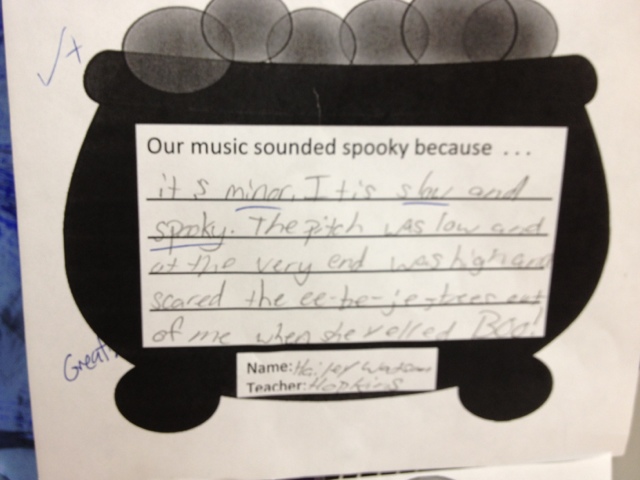
Students in grades 2-5 completed an exit slip before they left class. They completed a sentence "Our music sounded spooky because . . ." I picked a few papers from each class to frame my door. Here are a few student responses


The winners of the door decorating contest have not yet been announced. I'll let you know if my time and effort is rewarded.

Saturday, October 20, 2012

Monkey Drum App


Monkey Drum-Free App

This is another FREE app that I think will be very useful in the music classroom. The main menu allows you to pick 2 ways to play. This is how the menu looks on an iPhone or iPod. When you click on the center image, you enter the most basic type of play. Here, you can play rhythms and melodies on instruments and when you pause or finish your phrase, the monkey will be a copy cat and repeat exactly what you just played. (Get it? Monkey see, monkey do!) The more you play, the more the monkey starts showing he likes your music by clapping or even dancing. 


After playing a little while, you and the monkey are rewarded with a banana to feed the monkey. After eating 3 bananas, you get 10 free hearts to use to purchase more instruments, more animal characters, or even accessories to dress up your monkey. You also get 15 free hearts each day you play. Just check the mailbox on the main menu to get your daily free hearts.

The game comes with 3 instruments unlocked for free (djembe drum, thumb piano, and xylophone). Other instruments available to unlock with heart coins are congas, an acoustic guitar, and a microphone. 


Another way to play is the Song Maker. For the youngest children, they can just have fun exploring sounds by drawing shapes on the boxes. For older children, they can carefully compose intricate rhythms, melodies, and harmonies. the bottom right corner features a page turner. Each page features 8 beats. (If you choose a faster tempo, you may treat each page like a 4 beat measure allowing you to compose with eighth notes and syncopation.) I believe you can have an unlimited number of pages/measures in your composition. (I scrolled down to 207 and it was still going!) When you hit play, you get to view the animals in video mode playing your composition.


There are also a few preloaded songs you select and then edit to create your own variation. Sometimes its a little overwhelming composing from scratch. Some students may like to start with a framework first. 

For more on the Monkey Drum app, visit http://flippfly.com/monkeydrum/. 

Classroom Application

So far, I have only used this app with one kindergarten class. We finished our lesson very quickly; they were being great listeners and following directions! We had completed all the activities in my lesson plan and still had about 10 minutes left. So, I opened the Monkey Drum app and had them echo some simple rhythms with quarter notes and eighth note pairs. First, I played some rhythms and let the students watch the monkey be the echo. Then, I asked the kids to help the monkey when it was his turn to echo. After a few examples, I had individual students come up to play a rhythm on the monkey drum. I would tell them a rhythm and they would try to play it on the drum. When the monkey would echo it back, it was a great way for the class and the student to hear what they did and evaluate their performance. Most of them could hear right away if the rhythm was not exactly what I had originally performed. On this particular day, I was just using the app as a time filler, but I immediately made a mental note to use it as an assessment tool in the future. I can watch the students performing rhythms (either by echoing me or by reading notation).

With the older students, I think the Song Maker feature would be great for composition. First, the students could compose rhythms (or even a short melody) on paper. After I graded their work, they could try to notate it on the Song Maker. Obviously, not every student would have time to try it on the app if I only have one iPad. However, as I was introducing the Blob Chorus app to the students I started polling the students asking them who had an iPod touch at home. More than half in each class would raise their hands. I bet the students would love a chance to BYOD (Bring Your Own Device). If I attempt this, I will let you know how it goes.

Coda

My 2-year old daughter also loves this app! She loves to take turns playing with the monkey and she loves to feed the monkey the bananas. But, I think her favorite thing to do is to check the mail! She loves to open the mail and try to read the letter. This app can entertain a wide range of ages!