Showing posts with label composing. Show all posts

Wednesday, March 31, 2021

Rainy Day Rhythms

It is spring! I've got some rainy day resources for your music lessons.

This video is a read aloud of "Listen To the Rain" by Bill Martin, Jr. and John Archambault. It is paired with Chopin's "Raindrop Prelude". It starts bright with gentle sprinkles. The middle section is more dark and gloomy as the storm brews. At the end, the sun returns with a rainbow and it is bright and happy again. The music and book pair so well together. 


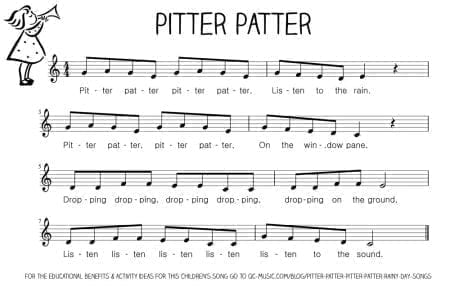
I used the song "Pitter Patter" from Let's Play Music. I actually turned this song into an ABA form to mimic the book. I asked the kids to create some motions for the A section and some different motions for the B section.


We created some rhythmic compositions to replace the B section of the Pitter Patter song. Since I am teaching digitally at the moment, I created a Scratch game to aid in their compositions. The students can click on the rhythms to cycle through 8 different rhythm choices. They can click the green button to hear the rhythms. They can click the purple button to hear the song in ABA form with the rhythms inserted as the B section. 


I hope your students enjoy some of these rainy day music activities!

Saturday, October 19, 2019

Orff Arranging With An App

I love to use the Acapella app to help create Orff arrangements. You can record videos and hear multiple parts simultaneously. There is a free version and paid version available in the Apple Store and Google Play.

With the free version of the app, you can record up to one minute in length.  Since most of the Orff arrangements use repeated ostinatos, I have never needed a video longer than one minute. The paid upgrade offers longer videos and more options for formatting the video windows. 

I have used the Acapella app to create videos to share Orff arrangements with other teachers. I have also posted videos on my classroom webpage for students to watch and practice at home. A few examples can be found below. 


I have recently explored the social features of the app and would love to collaborate with other music teachers. If you download the app, you can click the “Discover” tab at the bottom of the screen and search for song titles, artists, tags, or people. I have added the tag #orff or #recorder to my videos.. If you would like to follow me, search for “mrsdennis” under people. If you follow me, I will follow you back. I look forward to building a community of music educators sharing Orff arrangements with each other!


Friday, September 6, 2019

Friday Reflection: Creating


Today's reflection focuses on "Creating" in the music room. Watch below to learn more about how I introduce composition to my students.


Here are some links to learn more about things referenced in this video:


Saturday, September 1, 2018

Challenging Early Finishers


In every subject, in every class, there will always be students who finish very quickly and others who need extra time. But, how do you keep the early finishers engaged and allow enough time for the entire class to finish?

I recently did rhythm composition lessons with 3rd, 4th, and 5th grade. We always complete an example on the board together and then they are given their own paper to compose on their own. Many students will finish quickly, others may need help and take longer.

These staggered finishes are perfect to allow me to also hear them perform their compositions. As they finish, they have to come to my desk and vocalize their rhythm while clapping, patting, or drumming on the edge of my desk. I tell them that an author wouldn't use words they couldn't read, so composers should not write music they can't also perform themselves. This also allows time for me to grade their papers in class and not have to take anything home! They get 2 grades during this assignment--one for their composition and one for their performance.

After performing for me, I needed something to challenge those early finishers. In the past, I've allowed them to get instruments out of the cabinet to perform their rhythms. But, this becomes very loud and distracting for those who are still composing. My 5th grade classes currently have 35 students each, so instruments were not an option. I've also challenged them to create more rhythms on the back, but only a few students were interested in that.

My newest idea was a great success!! I told the students to have others perform their rhythms and if they did so successfully, they can autograph the back of the music. I challenged them to get as many signatures as possible. They all loved this idea and were asking everyone to perform their composition. It allowed plenty of time for all students to finish their compositions with minimal distractions.


The 4th grade paper is pictured above. It was a full sheet of paper with a blank back. They were able to sign their full names. The 3rd grade papers were half sheets with content on both sides; they did not have a blank space. I told them they could sign their initials in the margins around the rhythmic composition and they still enjoyed the activity.

I'm sure the novelty of this activity will grow old if I use it often. So, please share your ideas below. How do you challenge early finishers?

More details about the lessons discussed in this post can be found at the following links:

More about these composition activities can be found on these links:


Wednesday, August 30, 2017

Welcome Back, Class: A Review Unit


To start the year, I plan a unit that will review many musical elements and dust off the vocabulary they may have forgotten over summer. This is a 3-lesson unit for 4th grade which will get the students playing rhythms, singing a melody, playing harmony, improvising, and composing. Here is an overview:

Lesson 1:

I begin the unit with body percussion, including patting, clapping, rubbing, and stomping. We review rhythmic durations by viewing the notation on the board including quarter note, half note, eighth note pairs, and quarter rest. I review dynamics by adding a crescendo on the 3rd phrase. We review the element form and perform the poem in a 2 part round with voices and body percussion. Then, we review timbre and add hand drums.

Lesson 2:


The Remix!!! We review the poem and discuss the musical elements. We discover we were missing melody and harmony in our previous lesson. We echo solfege and review the lines and spaces on the staff. We perform the melody on Orff instruments. We add a broken bordun for harmony. I have the students echo a rhythmic phrase "Fourth Grade Rocks!" They improvise with that phrase twice. I give them parameters for their improvisation. The first phrase CANNOT end on do (C). The second phrase HAS to end on do (C). We perform the improvisations in small groups: 1) glockenspiels; 2) alto/soprano xylophones; 3) metallophones, 4) basses. Our final performance is ABA form with the improv sandwiched between the song.


Lesson 3:

We compose! The students match school subjects with the correct rhythmic building block. I ask them to create a phrase using 8 books. I give them some parameters for composing. I ask that the last book be a rhythm with quarter note and quarter rest. I also ask that the phrases begin with the same 2 books. (Books 1 and 5 should be identical and books 2 and 6 should be identical). The students first get in small groups and use manipulatives to compose. Using manipulatives first saves the erasers on my pencils!!! When the group can perform the poem both verbally and with body percussion, they are given a worksheet to notate their patterns. When everyone is finished with their worksheet, we do a final performance in rondo form sharing the book compositions. We alternate the "Welcome back, Class" poem with each individual group.


This unit is always great fun! After only 3 lessons, I can say my students have used body percussion, played drums, played xylophones, used expressive speech, used their singing voice, performed in round, with ABA form, and rondo form, improvised melodically, and composed rhythms! It is a great way to start the year!


If you are interested in teaching this unit, you can search my TpT store for full lesson plans, PowerPoints, printable worksheets, and manipulatives.


Sunday, March 26, 2017

31 Days of Rhythm: Teach Rhythm with Game Centers


Happy Music In Our Schools Month! I am teaming up, once again, with some fellow music ed bloggers for "31 Days of Rhythm". My first post on March 17th was about Rhythmic Popcorn. Today, I will be sharing ideas for teaching rhythm with game centers.

I began using centers about 3 years ago. Centers provide an opportunity for the class to be engaged in activities while I work with small groups. I use centers every time I have recorder playing tests or when I want to hear individuals sight read short rhythms or melodies on flash cards. I have also used centers to isolate a small group on ukulele and provide more feedback to individuals correcting hand positions and strumming technique. Centers are also great as emergency sub plans! Most substitute teachers have no background knowledge in music. Centers allow my students to reinforce music skills while I'm not there.

I have many posts about centers, but today I will briefly describe a few that make connections to rhythm.

#1) Over the Edge

"Over the Edge" is a game to reinforce rhythmic durations. It is a free printable from pianamation.com. Students each have a game board with a waterfall. They draw cards and place bingo chips or glass pebbles on their river to equal the number of beats of the note or rest. The object of the game is to be the last person who has not filled their card and fallen off the waterfall. My full post on Over the Edge can be found at this link.


#2) Rhythm Rockets

Rhythm Rockets are part of Artie Almeida's Music Proficiency Packs. This game tests students' ability to read and perform rhythms and their ability to recognize them aurally. Each student gets a rocket with identical rhythms. The official instructions may be different, but I'll describe what works best with my students. I have a small group sitting in a straight line. One student stands in front of them and chooses a rhythm from the rocket to perform for the group. They can either count it out loud using rhythmic syllables or perform it with body percussion. The students identify which rhythm the individual was performing by placing a clothes pin on the side of their rocket. Then, they must put their rocket on top of their head. This will allow the individual performing the rhythm to easily recognize who got the correct answer first. The winner will get to perform a rhythm for the group next. My full post describing Rhythm Rockets can be found here.


#3) Sneaky Snake

Sneaky Snake is another Music Proficiency Pack by Artie Almeida. This game requires students to recognize notation symbols such as notes, rests, clefs, bar lines, etc. I have found this game works best in pairs. The symbols appear on one side of the paper while the written name appears on the back. There are holes in the cardstock beside each symbol. Partners sit facing each other holding the snake page between them. One partner calls out a symbol and the other partner must identify it by sticking a straw in the corresponding hole. My full post describing Sneaky Snakes can be found here.


 #4 Beat Strips

Beat Strips are another Music Proficiency Pack from Artie Almeida. They provide opportunities for students to compose 4 beat patterns using quarter notes, eighth note pairs, and quarter rests. This can be done to freely compose and perform for a partner. This could also be a dictation game. One individual could perform a rhythm from a list you provide and the group would have to notate it on their beat strips. My full post describing Beat Strips can be found here.


#5) Connect 4

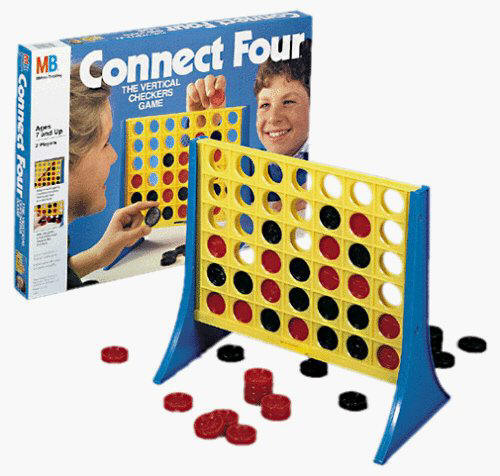
Recycle that old board game and turn it into a music center! The classic version of Connect 4 is a fun game to compose with simple quarter notes and quarter rests. The red checkers could represent notes while the black checkers represent rests. This would be great for kindergarteners. To challenge older students, I found this Connect 4x4 game at a yard sale. It features 4 colors of checkers which could represent different instruments. In the picture below you can see construction paper squares that helped the kids remember which color they should play. It also has checkers with holes in the middle which could represent rests. The full post describing Connect 4 can be found at this link.


Thank you for visiting my blog for 31 Days of Rhythm. If you would like to read more posts from this event, you may visit Facebook and follow the MusicEd Blogs page.


Wednesday, July 1, 2015

July 1st Music Freedom Freebie!

I have joined in with several other music teachers to offer some fabulous resources for free today only! My resource is a pdf file presenting the poem "Cobbler, Cobbler" along with a printable worksheet for students to compose using rhythmic building blocks.


Follow this link to find my freebie:
https://www.teacherspayteachers.com/Product/July1stMusicFreedomFreebie-Cobbler-Cobbler-1933942

Follow this link to view all July 1st Music Freedom Freebies:
https://www.teacherspayteachers.com/Browse/Search:july1stmusicfreedomfreebie

Saturday, January 18, 2014

Free Apps For Young Composers


I have found two more free apps that allow young students to explore music composition.

Tune Train

The first app is called Tune Train. There are 10 musical worlds available to explore.  Each world features a different musical style.

 iPad Screenshot 5
On each beat, you see people high and low. They essentially outline a chord. You use the train to draw a path and select people/notes you want in your melody. If you want to omit a note on that beat, you can make the train bypass that stop completely. This gives you options to alter the rhythm as well. Each student could create a truly unique song even if they selected the same musical world.

iPad Screenshot 2

You can also view the actual music notation at the top of the screen.

iPad Screenshot 4

Here is a video demonstrating the app:


___________________________________________________
Music4Kids
The second app I have found is called Music4Kids. In this app, you see an actual treble clef staff. When you place a note on the staff, the pitch name also appears above it. Each note defaults as an eighth note. To make longer durations like quarter and half notes, you must hold your finger on the screen for a longer time.
iPhone Screenshot 1
There are 5 different musical planets available: birdy, hamster, octopus, fox, and ghost.
iPhone Screenshot 4
There is an option to save your composition to your "My Tunes" library. This may be a helpful tool for teachers. If students create a song during class, the teacher can go back through later to view what their work.

There is also a part of the game called "Challenges." This is a simple introduction to melodic dictation. Initially, the app will show you the music notes and play the melody. Then, you must notate the melody. If you need help, you may listen to the tune again, but it will not show the notation a second time.
Here is a short video demonstrating the app:


___________________________________________________

Both apps are very kid-friendly and easy to navigate. The fact that they are free is also a wonderful bonus! I look forward to using these in the classroom.

Friday, December 13, 2013

Music Centers

During the week of Thanksgiving Break, I didn't want to start a lesson or unit when I wouldn't see all the classes of the week. So, we experimented with music centers. I have 50 minute classes, so I chose 4 centers. It took about 10 minutes to explain the games and then students travelled in groups and had about 10 minutes at each center. They seemed to enjoy them, so I will definitely try this again later in the year with all the classes. Once the kids have tried the centers, they would be great for emergency sub plans!

Giant Staff Twister


In a previous post, I shared the activity where we did relay races with our giant floor staff. Jen Fink, at pianamation.com, has used the floor staff to play a modified game of Twister. She created cards you can use for the game, one deck contains body parts (hands and feet) and one deck contains lines and spaces and they are available to print from her blog. We decided to make the game like traditional Twister and create spinners. The spinners are available on my teacher-pay-teacher store.


Boomwhacker Center


In the Boomwhacker center, students practiced note reading. They took turns playing songs from the book "Whack-a-Doodle-Doo!" I have 2 copies of this very affordable book ($5.95 from westmusic.com) One student would attempt to play a song. The next student in line would be able to flip through the extra book to select the song they would like to perform for their turn. This book includes colored notation made it easy for the older students to perform the songs. The younger students needed assistance, so my student teacher positioned herself at that center.

Connect 4 Composition

The younger grades used a Connect 4 game for rhythmic composition. They took turns filling the bottom row with checkers.  The red checkers represented a sound and the black checkers represented a rest. The students performed the rhythms on lollipop drums. Unfortunately, I did not get a picture of the younger students in action at this center.
For the older students, I used a more advanced game, Connect 4 x 4, with 4 different colors--red, yellow, green, and blue. I selected a few unpitched percussion instruments and the students would decide which instruments would play for each color. The students took turns creating new compositions and experimenting with different timbres at the same time. This version of the game has full and empty checkers. I forsee these representing quarter notes and half notes at some point in the future. (Connect 4 x 4 can be found on walmart.com for $19.86)


Technology Center

The technology center used the Interactive whiteboard and the iPad. On the Activboard, the students took turns on a game from nyphilkids.org. The game pictured below is "Music Match Instruments" which is a memory-type card game. I have also collected links to many other music sites and they can be found at this link.


They students could also play a music game on the iPad. Make sure you check out a previous post sharing 110 free music apps for the iPad. Kindergarten and 1st grade were playing rhythms on Monkey Drum. 2nd and 3rd grade were reading rhythms on Rhythm Cat. 4th and 5th grade were testing out a new app Cookie Beats. Look for a review of this app coming soon!


I have dedicated an entire Pinterest board to 
Check it out for more great ideas!


Wednesday, November 6, 2013

Music Proficiency Packs

Do you have any of Artie Almeida's Music Proficiency Packs? 
I have 3, so far, and the students love them!

Pack #1--Rhythm Rockets

Each card features 8 simple rhythms with ta, titi, and quarter rests. You can use these as a class activity, small group, or partners. Someone counts a rhythm and then another student identifies the rhythm by moving their clothespin next to the correct rhythm. You could also use the rhythms as a starting point for melodic improvisation on xylophones or recorders.  If you have another idea for these, please share below! I laminated my cards to be more durable. The clothespins are also recycled from another teacher. This can be found at westmusic.com for 14.95.


Pack #2--Sneaky Snake

This game helps students test their knowledge of simple notation symbols. Each card features the symbol on the front and the name on the back. There is a hole next to each symbol. This game is intended to be used with partners. The student viewing the back of the snake would stick the pencil or straw in the hole and the other student would identify the name of the symbol. I use straws so the pencils do not make marks on the card stock. I did not laminate these cards because I did not want to punch holes afterwards. These cards come with the holes already punched and I did not want to take the time to do that myself! This is also 14.95 at westmusic.com.


Pack #3--Beat Strips and Rhythm Markers

This game is allows students to practice rhythmic composition. The beat strips are in 4/4 time signature and the rhythms provided are quarter notes, eighth note pairs, and quarter rests. I laminated the beat strips and rhythms before cutting them apart. To contain all the pieces, I used legal sized envelopes. I taped the beat strips to the outside of the envelope and all the rhythm pieces are stored inside the envelope. Students could be given freedom to compose their own rhythms, or they could use these kits to dictate rhythms given by a teacher or student. I have even asked students to dictate simple sol-mi melodies by making the rhythms move higher or lower on the beat strip. Students could also get in small groups and make longer rhythmic phrases by lining up more than one envelope. This pack is also only 14.95 on westmusic.com.


Do you have these or any other Proficiency Packs? If so, please comment below sharing your favorite lesson ideas. Pack #5--Melody Mice is next on my wish list!

Friday, January 4, 2013

110 Free Music Education Apps

I've had the iPad for about 3 months and have downloaded many free music apps. I have organized them into the following folders so that all the music apps can be found on one screen. The folders are shown in the screenshot below:


Listening


1) Classical Lite
2) SPCO (Saint Paul Chamber Orchestra)
3) NPR Music
4) Pandora
5) Classical Music For Babies
6) iLuvMozart
7) Classical 1
8) Beethoven Symphonies
9) Classical Masters
10) Mozart Symphonies
11) XmasRADIO


Sound Exploration

12) Falling Stars
13) Soundrop
14) Singing Fingers


Metronomes

15) iBeat
16) Pro Metronome
17) iMetronome
18) Gibson Studio Share (This has a metronome and tuner.)


Tuners


19) Pitch Pipe Now
20) AccuTune
21) insTuner


Singing

 22) I Am Composer. Sing and then see your music notated on a staff.
23) Monster Chorus. Monsters who sing the pitches of a scale.
24) Karaoke HD. Comes with a few free songs with the option to purchase more.
25) Songify. Records your speaking voice and then auto-tunes it into an instant song.
26) Sing Along Christmas Carols Free. Words appear on screen karaoke style.


Woodwinds

27) Honey Harmonica
28) Bagpipe. You have to blow on the microphone receiver to play it!
29) Zampona
30) Ocarina 2. You also have to blow on the microphone receiver to play it.
31) WoodwindIA. The English Horn is free; you must purchase the other instruments.
32) Shehnai HD
33) Recorder Master. Play along with your recorder or by touching the screen.


Strings

34) Classical Violinist. Violin, Guitar Hero-Style
35) Ukulele. I love how you hold the iPad like a real instrument to play it.
36) Guitar
37) Bass Guitar!
38) Santoor
39) Celtic Harp Lite
40) 12-String Lite
41) WI Orchestra. This is a piano keyboard, but the violin sounds are the only ones that come free.
42) On The Music Path. Videos teaching how to play guitar and other folk strings.


Percussion

43) iTriangle
44) Congas
45) Bongos
46) iTablas
47) Chakra Chime
48) Slit Drum
49) Washboard
50) Percussion for Kids. A mix of congas, bongos, maracas, wind chimes, and triangle.
51) Awesome Cowbell Free. A selection of 3 different sizes of cowbells.
52) Bottle Xylophone
53) Marimba. The lowest note is an A (I wish it were a C)
54) Sansula Lite Thumb piano
55) Drum Man An aerial view of a drum set.
56) Bottle Music Make music with bottles or wine glasses.
57) Finger Stomp Lite

Brass

58) BrassIA. The piccolo trumpet comes free; you may purchase other instruments.
59) TrumpetLiteHD
60) TromboneLite
61) FrHornLiteHD
62) Trumpet+ Lite
63) Vuvuzela Man


Instruments

(Apps with instruments from multiple familes)

64) Music Instruments by Tidels Free Flashcards with real images of musical instruments.
65) My Musical Friends HD Cartoon versions of the instruments to appeal to younger students.
66) Melody Street An interactive story to introduce the instruments.
67) Mozart Interactive You get to choose which instrument will play next.
68) Kids Musician A preschool app exploring percussion and keyboard instruments.
69) Music Sparkles A glockenspiel and drum set are unlocked for free.
70) Music School For Toddlers. The piano is unlocked free. I like how the note names appear above the keys.


Piano

71) MiniPiano One octave, full-size keys.
72) iPiano Lessons Instructional videos about the piano.
73) Piano Free Full 88 keys, adjustable size, with a metronome and songs.
74) Magic Piano Play beautiful piano music by touching lights as they move across the screen.


Playing Piano

75) Music Intervals. Quizzes intervals on treble or bass clef.
76) Music Keys. Quizzes pitch names of piano keys.
77) Music Tool. Shows how to play chords on the piano keyboard.
78) Inversion Invasion A space-themed game improving chord building.
79) Piano Prodigy. Play songs from color-coded solfege.
80) Dust Buster. A game that can be used with the touch pad piano or can use the microphone to pick up the sound of a real piano or keyboard.
81) Pluto Piano. Play songs on a touch piano or by navigating a penguin up and down the staff.
82) Piano Hero. Dual player touch pianos on each side of the iPad. Play the keys as the lights approach the keys.

Rhythm

83) Rhythm Cat HD. Read rhythms and tap the screen.
A previous post on Rhythm Cat can be found at this link.
84) Rhythm Training. Read rhythms and tap the screen. You may also practice at different tempi.
85) S4-RComposer Create beats and loops with electronic percussion sounds.
86) Monkey Drum Play rhythms and let the monkey echo you, or compose your own tunes.
A previous post on Monkey Drum can be found at this link.

Ear Training

87) Pickup Tunes Free Ear training games recognizing intervals and scale degrees.
88) Nail That Note Lite Absolute, melodic, and relative pitch trainer using a piano keyboard.
89) Blob Chorus. Aural game matching pitches.
A previous post on Blob Chorus can be found at this link.
90) Ear Trainer Lite. Practice aural recognition of intervals, chords, and scales.
91) Right Note Lite Ear Trainer assessing intervals, pitch, and melody.
92) Musical Puzzle HD Arrange a song by correctly ordering jigsaw pieces containing short melodic phrases and notation.


Harmony

93) Sound Prism Explore harmony with lights and patterns on a grid.
94) Harmonizer Explore harmony with lights and patterned shapes.


Memory Games

95) Piano Game. An aural game of Simon challenging your ear training skills.
96) Rhythm Repeat Lite A memory game echoing rhythmic and melodic patterns.
97) Young Music Genius. Consists of several games. One game is memory-style flipping instrument cards over until you find a match. There is also an instrument quiz aural identifying instrument sounds and a composer quiz identifying musical excerpts by listening.

Staff

98) Note Brainer. Assess note reading flash-card style. You can customize the game for treble or bass class only.
99) ClefTunes Lite Touch notes on a staff to hear the pitch.
100) Playpad. Touch lines or spaces on the staff to hear their pitch.
101) Penguin Chase. Touch a penguin and navigate him up and down a staff to play a melody, avoiding obstacles. Watch out, the tempo continues to increase!


Genres

102) Blues Cats Explore blues music by selecting which instruments you would like to hear.
103) Jazz Cats Explore jazz music by selecting which instruments you would like to hear.
104) Country Cats Explore country western music by selecting which instruments you would like to hear.
105) Spanish Sound HD Explore Spanish music by selecting sound clips.

Sheet Music

106) Sheet Music Direct. A library of scores. Lots of music can be previewed for free or purchased through sheetmusicdirect.com.
107) Tonara Some music is offered for free. The best feature of this app is that it turns the page automatically as it hears you performing the music.
108) MusicStandPad Scan your own sheet music and store it digitally using Dropbox. This app will connects to the Dropbox library to view your music. You may write on the music to take notes and turn the page with just a flick of a finger.
109) Steinway Etude There are many free songs, but you can also purchase more sheet music. But I love the setting that shows you the strings on the inside of the piano while it plays the song selected.


 110) My Note Games

My Note Games. This last app is not in a folder because it could belong to many categories. This features music theory and note reading games you can use with just your fingers on the touch screen, or with your singing voice, or any musical instrument (including recorder).


If you have any other suggestions to add to this list, please comment below.